Understanding the Coming Soon Form
Coming Soon status allows sellers to market their property before it’s ready for showings, but it’s important to understand the rules and requirements. Learn when to use Coming Soon, how to complete the authorization form and which key dates and deadlines to keep in mind to stay compliant with NorthstarMLS rules.
November 11, 2026
Your seller has signed a listing contract, but the property is not ready for showings. Coming Soon status allows the listing to appear on NorthstarMLS and public real estate websites while the seller prepares the property. Here is how to use the form and understand the dates.
When to Use Coming Soon
Discuss the Coming Soon option with the seller when signing the listing contract. Use it when the seller wants the property publicly marketed before showings begin. For example, the seller may need time to finish painting, clean or prepare for a move.
An effective listing contract does not mean the listing must be in Active status on the MLS. The contract establishes your authority to list the property; the MLS status tells other agents whether the property is ready for showings.
Enter the listing in NorthstarMLS within two business days of the list date or signature date, whichever is later. If the seller chooses Coming Soon, enter it in that status and upload the completed Coming Soon Authorization Form to the listing.
Understanding the Dates
Contract Date and Contract Expiration Date identify when the listing contract begins and ends. These dates should match the listing contract.

Availability Date is the date the property becomes available for showings. NorthstarMLS automatically changes the listing from Coming Soon to Active on this date. Coming Soon status cannot exceed 21 days from the date of entry.

No showings are allowed while the property is in Coming Soon status, including showings by agents in the listing broker’s own office.
Signature Dates and a Later Coming Soon Date
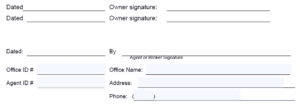
The dates next to the signatures show when the sellers and agent or broker signed the form. They do not replace the contract dates or the Availability Date.
If the seller wants the listing withheld before it enters Coming Soon, use the Certification to Withhold form for that period. The withhold form must be entered within two business days of the listing contract’s start date. You may also note the planned transition date on the Coming Soon form, but that note does not replace the withhold form.
The Listing Contract Must Be Effective First
The Coming Soon form does not replace a listing contract or allow you to enter a listing early. Before the listing contract’s start date, a listing may only be saved as Incomplete. It cannot be entered in Coming Soon or another MLS status until the contract is effective.
If the Seller Is Ready Sooner
A seller may choose to move the listing to Active before the Availability Date. Get that instruction in writing and update the listing. Notify any agents who already have showings scheduled so they have the opportunity to reschedule for the earlier date.
Other Limits to Remember
A listing that has already been Active cannot return to Coming Soon unless it has been off the market for more than 90 days, has sold, or is listed with a new brokerage.
If the seller is still not ready for showings after the 21-day Coming Soon period, use Temporarily Not Available for Showings (TNAS) status rather than extending Coming Soon beyond the limit.
Before entering the listing, confirm the contract dates, obtain the completed authorization, and choose an Availability Date when the seller will be ready for showings.
Have Questions?
Stil have a question about Coming Soon? No worries! The Rules & Regulations team is here to help. Call us at 651-251-3210, or email us at rules@northstarmls.com.

Explore More

Share This Article
Related Insights
Stay up-to-date on the latest information from NorthstarMLS. From Subscriber Benefits to industry news, our articles have insights and analysis to help expand your real estate knowledge.
Why MLS Data Integrity Matters to Everyone
Accurate, complete and reliable listing data helps real estate professionals make informed decisions and builds trust throughout the real estate…
Is It Really a Bedroom? What to Know for Your Listings
Not every room that looks like a bedroom can be listed as one. Learn why bedroom requirements vary by location,…
Ask David: How Do Manufactured Homes Differ from Modular Homes?
Manufactured, modular, tiny home or RV? Learn what sets each property type apart and why knowing the difference is essential…