Ask David: What are underused features in InfoSparks?
InfoSparks does more than you think. If you’re only using it for quick charts, you might be missing some of its best features. Learn how these underused tools can help you present cleaner reports, define smarter markets, and get more value out of the MLS data you already rely on.
February 10, 2026
If you’ve spent any time looking at market stats in NorthstarMLS, you’ve probably come across InfoSparks. It’s our interactive market statistics tool that lets you explore MLS data through charts, graphs and visuals, covering everything from pricing trends and inventory to days on market and sales activity.
Maybe InfoSparks is a daily go-to for you, or maybe it’s something you know about but have yet to explore. And that’s okay, because even experienced users are often surprised by what they’re missing.
I want to highlight two powerful but underused InfoSparks features that can save you time and help you present market data more clearly and professionally: Sharing and Map Search.
Sharing: Flexible and Professional
InfoSparks puts all your print, export and email options in one place, making it easy to share charts, images and raw data tables in the format that works best for you.
The data you share is always clearly attributed to you. Every shared item includes the contact information included in your InfoSparks profile, which can include a photo and data automatically pulled from your MLS profile.
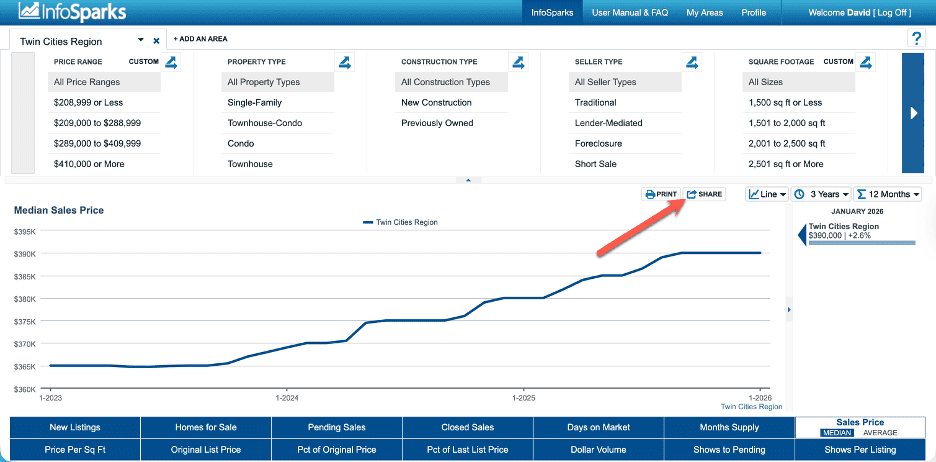
Share in two quick steps:
Step 1: Choose live or static data
- Live shares stay connected to the MLS and update automatically
- Static shares capture the data exactly as it appears
Step 2: Choose how to share it
You can share your data as:
- A printable PDF
- A link for email or social media
- An embeddable widget for your website or blog
- Raw data (.csv) for customization in a spreadsheet
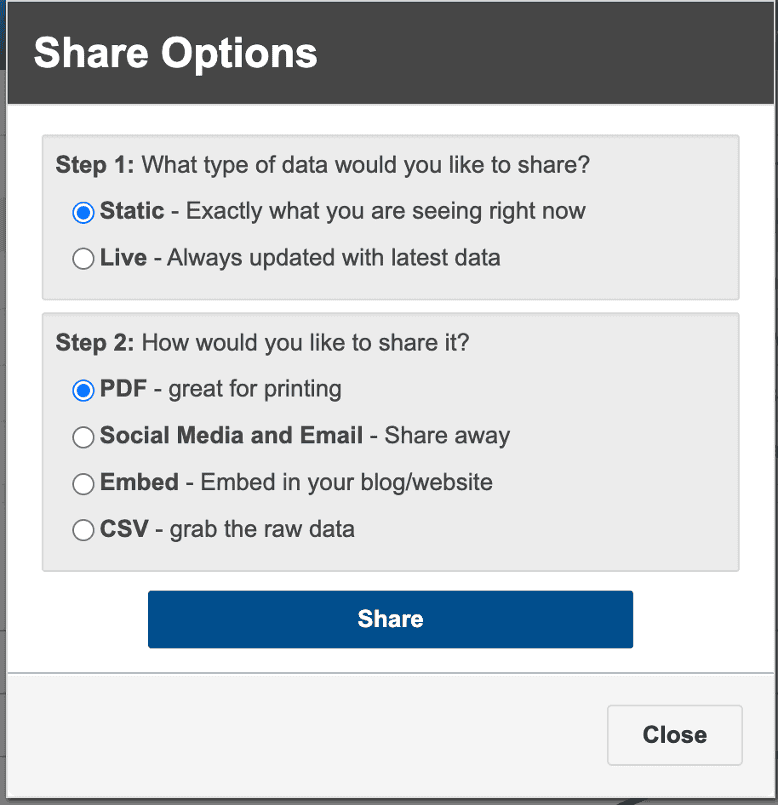
Once selected, InfoSparks provides a URL you can share, open or download. If you want to change your settings, just select “Start Over.”
A few things to know:
- Shared charts are active for six months and can automatically extend as long as you’re an active MLS subscriber and the chart is being viewed.
- Charts can also be renewed by logging into InfoSparks before they expire.
- CSV sharing follows different rules and is designed for longer-term access.
The takeaway: Whether you’re sending a polished chart to a client or exporting data for deeper analysis, InfoSparks gives you clean, flexible sharing—no screenshots required.
My Areas: Define Your Market
Markets don’t always follow city, county, or ZIP code boundaries and My Areas lets you work with that reality.
The My Areas feature in InfoSparks gives you a map-based interface where you can draw your own custom areas and instantly view statistics for the exact market you want to analyze.
You can start by selecting a predefined area or by searching for a location such as an address, city, landmark or ZIP code. From there, use simple polygon or circle tools to draw custom shapes directly on the map.
Once you save an area, InfoSparks shows you the square mileage and number of listings included, and you can jump straight into the stats. After saving, a My Areas filter appears alongside other area filters throughout InfoSparks, making it easy to reuse your custom boundaries.
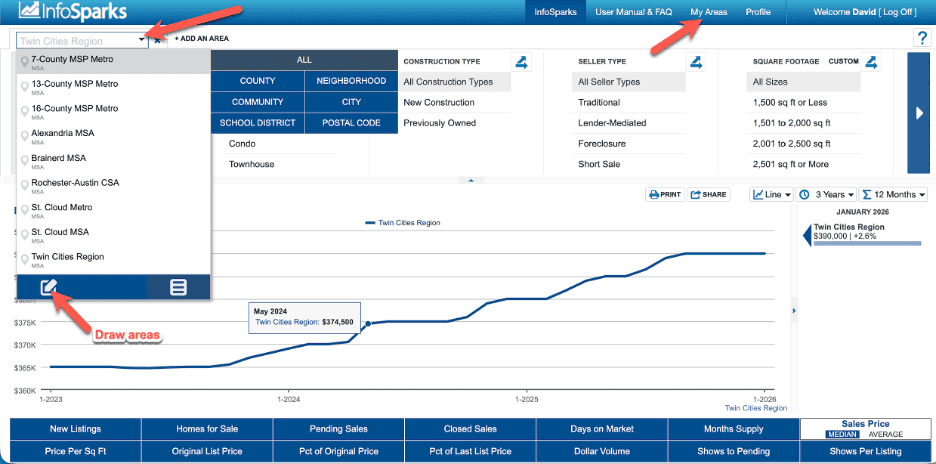
A few helpful things to know:
- Saved areas are accessible from a My Areas dropdown on the map.
- Areas not used for a while are archived, not deleted.
- Archived areas can be reactivated at any time.
The takeaway: My Areas lets you analyze the markets your clients actually care about, instead of forcing your questions into predefined boundaries.
For more information, review the InfoSparks product page, or the User Manual & FAQ when logged into InfoSparks.
Need Help?
For questions, contact the NorthstarMLS Help Desk at help@northstarmls.com or call 651-251-5456. For MLS compliance, contact the Rules and Regulations department at rules@northstarmls.com or call 651-251-3210.

Explore More

Share This Article
Related Insights
Stay up-to-date on the latest information from NorthstarMLS. From Subscriber Benefits to industry news, our articles have insights and analysis to help expand your real estate knowledge.
Making Compliance Clear, Consistent, and Easy to Navigate
NorthstarMLS has improved the way we communicate compliance issues so you can quickly understand what’s needed and how to resolve…
Ask David: What are the And/Or/Not options in Matrix search fields?
Matrix allows users to search for listings using a robust list of search fields. This is how to use the And/Or/Not…
2025 NorthstarMLS Subscriber Survey: You Said. We Did.