Ask David: What settings and tools are available to manage media and listing visibility on public websites?
Using Display Listing on Internet, “No” to manage photo and listing visibility while keeping listing media in the MLS.
November 21, 2025
Clients sometimes ask how to keep listing photos from the properties they buy or sell out of public view. There are a couple of ways you can satisfy this request.
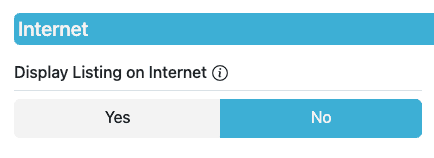
One of the most effective tools for managing visibility is the Display Listing on Internet, “No” field in Add/Edit. When you select “No”, the listing and all its photos remain available within the secure MLS system for subscribers, but the listing does not appear on public-facing websites. This allows you to keep a complete set of photos in the MLS database without removing them before close. It also helps maintain accurate records for future reference, CMAs and appraiser research.
Many MLS subscribers find this helpful when sellers prefer additional privacy near closing or want the property removed from consumer portals while keeping full listing media intact. It is important to know that if you choose Display Listing on Internet, “No”, the sold listing record will not appear on public sites. The full entry remains visible to MLS subscribers, but it will not populate consumer platforms. Please note, once a property is Closed in the system, NorthstarMLS subscribers will need to contact the NorthstarMLS help desk for assistance (submit a change form) to change Display Listing on Internet setting to “No”, or to edit any media for them.
To update this field:
• Go to Add/Edit
• Open your listing
• Locate the “Internet” section
• Select Display Listing on Internet “No”
• Save your changes
Or, the listing brokerage can delete all media within the listing input system, besides one image, prior to closing out the property in the MLS.
Need Help?
For questions, contact the NorthstarMLS Help Desk at help@northstarmls.com or call 651-251-5456. For MLS compliance, contact the Rules and Regulations department at rules@northstarmls.com or call 651-251-3210.

Explore More

Share This Article
Related Insights
Stay up-to-date on the latest information from NorthstarMLS. From Subscriber Benefits to industry news, our articles have insights and analysis to help expand your real estate knowledge.
Confused by Coming Soon Form Listing Dates?
Are you confused by Coming Soon Form dates? Here’s how to get them right!